AI Translator
Translate Voice Photos Text with the Leading Translation App


AI Translator — the leading translator for iOS and Android. Break every language barrier with AI Translator, the all-in-one translation app powered by cutting-edge AI. Whether you're traveling, working across borders, or connecting with people around the world, AI Translator gives you fast, natural, and context-aware translations in over 47 languages.
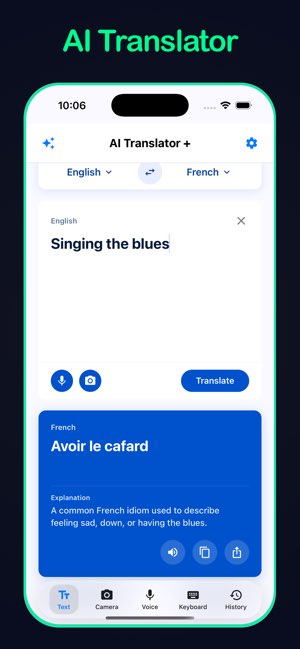
Translate Text in Seconds
Type or paste any text and get an instant translation. AI Translator doesn't just swap words — it understands meaning, context, and nuance so your message always lands the way you intend it.
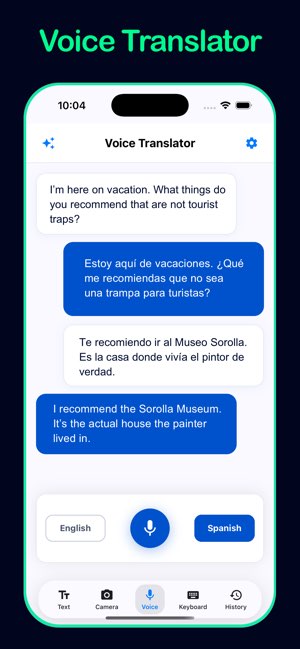
Speak and Be Understood
Use the Voice Translator to speak naturally into your phone and hear the translation spoken back aloud. Perfect for real-time conversations, travel situations, or hands-free use while on the go.
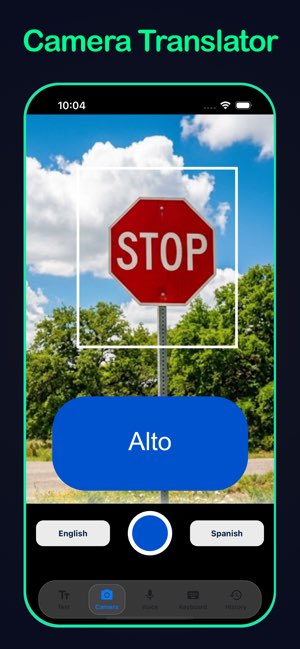
Point Your Camera, Translate Instantly
The Camera Translator lets you aim your camera at any sign, menu, document, or label and translate the text you see in real time. No typing required — just point and read.
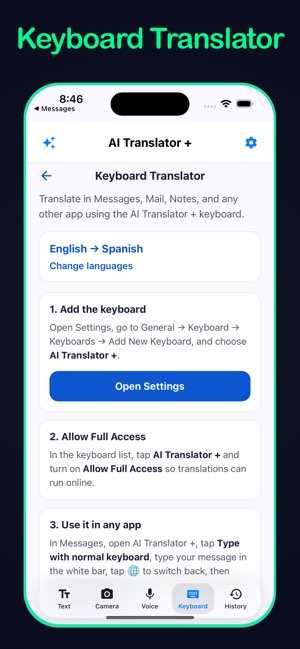
Custom Translation Keyboard
Install the AI Translator keyboard and translate without ever leaving any app. Write in your language, translate, and paste — all from your keyboard, inside Messages, WhatsApp, email, or anywhere else you type.
Translation History
Every translation you make is saved automatically so you can review, copy, or share it later. Your history is always a tap away.
Choose Your Tone
Not every message calls for the same style. Choose from Casual, Formal, Flirty, Business, Travel, Modern Slang, or Academic tone to make sure your translation fits the moment perfectly. Casual and Formal are free; additional tones are available with Premium.
Powered by the Best AI Models
Select between Gemini Light for fast everyday translations or upgrade to Gemini Pro for deeper accuracy and nuance on complex texts.
Offline Translation
Heading somewhere without reliable internet? Enable Offline Translation to download language models to your device and translate without any network connection, privately and instantly.

For travel, AI Translator puts a full language toolkit in your pocket. Point the Camera Translator at a menu, train schedule, or street sign and read the translation on the spot. Use Voice Translator for quick back-and-forth with hotel staff, taxi drivers, or new friends. Choose a Travel tone so phrases sound natural abroad, and download offline language packs before you leave so spotty Wi‑Fi never leaves you stuck.
Students benefit from more than a quick word swap. Free text translation includes AI explanations that clarify grammar, vocabulary, and why one phrasing works better than another. Select an Academic tone for essays and presentations, save translations to your history for review, and use the custom keyboard to draft messages or forum posts in another language without switching apps.
For business, AI Translator helps you communicate with confidence across borders. Formal and Business tones keep emails, proposals, and meeting notes professional. Voice Translator supports live conversations with international clients, while the Keyboard Translator lets you translate inside Outlook, Slack, or WhatsApp. Advanced AI models deliver nuance on complex documents when precision matters most.
47 Languages Supported
Afrikaans, Albanian, Arabic, Belarusian, Bengali, Bulgarian, Catalan, Chinese, Croatian, Czech, Danish, Dutch, English, Esperanto, Estonian, Finnish, French, Galician, German, Georgian, Greek, Gujarati, Haitian, Hebrew, Hindi, Hungarian, Icelandic, Indonesian, Irish, Italian, Japanese, Korean, Lithuanian, Macedonian, Malay, Maltese, Norwegian, Persian, Polish, Portuguese, Romanian, Russian, Slovak, Slovenian, Spanish, Swahili, Swedish, Tagalog, Thai, Turkish, Ukrainian, and Vietnamese.
Privacy First
Your translations are processed securely. Offline mode keeps everything on-device with no data sent anywhere.
AI Translator is free to download from the App Store and Google Play.
Premium Subscription
Unlock the full power of AI Translator with a weekly Premium subscription. Premium includes Voice Translation, Camera Translation, the Custom Keyboard, advanced translation tones, Gemini Pro model access, and Offline Translation. Subscription renews automatically unless cancelled at least 24 hours before the end of the current period. Manage or cancel anytime in your Apple ID settings.
Scan to download
Opens in App Store
That depends on your needs. AI Translator by Vidalingua was designed for people who need fast, one tap voice translation. You can choose the tone of the translation, get an explanation and other AI options.
AI Translator is available for iPhones, iPads, Android Phones & Tablets.
Apps like AI Translator can give the same instantaneous translation of voice input, but they can also provide explanations, allow you to choose tone, translate signs and menus, and a whole lot more.
AI Translator is free to download on iOS and Android devices. Text translation is free, including explanations of translation. AI Translator uses powerful AI models to provide translations and they incur a cost so we charge for premium features such as voice and camera translation.
For most of history, translation was a human craft. Scholars, diplomats, and merchants relied on bilingual experts to carry meaning across languages. The work was slow, expensive, and often imperfect, yet it remained the only reliable bridge between cultures for centuries.
The computer age changed that gradually. Rule-based machine translation appeared during the Cold War era, when governments funded systems that swapped words using dictionaries and grammar templates. Results were stiff and sometimes comic, but they proved that machines could assist with language at scale.
The internet brought translation to billions of desktops. Early web services let travelers paste phrases into a box and receive an instant, if rough, rendering in another language. Competitors multiplied. Google Translate launched in 2006, combining statistical methods with vast corpora drawn from the web. It became the default tool for quick lookups and grew into a platform supporting dozens of languages in browsers and on phones.
Microsoft entered the field with Bing Translator, later known as Microsoft Translator. Built into Windows, Office, and Edge, it gave business users a familiar option for document and conversation translation. Apple added Translate to iOS. DeepL won praise for natural-sounding European language output. Amazon, Yandex, and Baidu served regional markets. Each service improved fluency, speed, and language coverage, yet most still treated translation as a single task: input text, output text.
Mobile apps extended reach further. Travelers could point a camera at a menu or speak into a microphone and hear a phrase in another language seconds later. Offline packs appeared for flights and remote trips. Still, many tools felt like utilities rather than companions. They translated words but rarely explained why a phrase worked, whether it sounded formal or casual, or how to adapt a message for a specific situation.
Artificial intelligence marked the next leap. Neural networks and large language models learned context, idiom, and tone rather than matching word for word. Translation became more conversational and more aware of nuance. The gap between machine output and human intent narrowed quickly.
AI Translator by Vidalingua builds on that foundation while pushing past the limits of traditional apps. Voice Translator lets you speak naturally and hear a spoken reply, ideal for real-time conversation on the street or in a meeting. Camera Translator reads signs, menus, and documents through your phone lens without typing a single character. Keyboard Translator works inside Messages, email, and social apps so you never leave the conversation you are having.
What truly sets AI Translator apart is how artificial intelligence extends beyond the translation itself. You can choose a tone such as Casual, Formal, Business, or Travel so the result fits the moment. You can request explanations that clarify grammar, word choice, and cultural nuance instead of guessing whether a phrase landed correctly. Powered by advanced AI models including Gemini Light and Gemini Pro, the app balances speed for everyday needs with depth for complex texts. Offline translation keeps your data private on the device when the network disappears.
Google Translate and Microsoft Bing Translator normalized machine translation for the world. They made cross-language communication ordinary. AI Translator aims to make it intelligent, contextual, and personal. Voice, camera, and keyboard translation, combined with AI extensions for tone and explanations, have taken things to a new level for travelers, students, and professionals who need more than a literal swap of words.
If you have any questions, contact us at info@vidalingua.com



© Vidalingua