
Landing in Tokyo, Lisbon, or Mexico City with only textbook phrases is a fast path to awkward silences at the ticket machine. Travelers in 2026 expect their phones to carry voice translation for live chats, camera translation for menus and signs, offline packs for dead zones, and AI that explains nuance—not just swaps words.
This guide reviews eight translator apps travelers reach for on the road. We focus on features that matter when you are tired, lost, or ordering something you cannot pronounce—not on subscription tiers or numbers that change every quarter. Whether you need two-way voice with a taxi driver, a photo translation of an allergen label, or an explanation of why one phrase sounds polite and another does not, these apps cover real trip scenarios.
We evaluated voice quality, camera accuracy, offline reliability, language breadth, and AI capabilities such as translation descriptions and tone controls. Every app here is on iPhone or Android unless noted. Install one or two before you fly, test them at home, and download offline language packs while you still have unlimited Wi‑Fi.
A translator will not replace learning local greetings, but it rescues you when plans change, trains are delayed, or someone speaks faster than your ears can follow. The best translator app for travel is the one you trust at midnight in a foreign city—here are our picks for 2026.
We skipped pricing tables and star ratings that age quickly. Instead we stress what you can do on the ground: talk, point, photograph, download, and adjust tone. That is how translation apps earn space next to your boarding pass and power bank.
The reviews below are ordered for readability, not as a strict league table. Google Translate leads because it is the common baseline travelers already know. DeepL follows for written quality. AI Translator by Vidalingua ranks third for its travel-focused mix of voice, camera, offline access, and AI explanations with tone control—the combination we think frequent flyers should try early in their search. The remaining apps fill regional and stylistic niches worth knowing before you board.
What travelers need from a translator app
Voice translation is what most people use once they leave the hotel. Strong apps listen both ways, speak results aloud, and cope with background noise on busy streets. Conversation mode that alternates languages automatically lets you hand your phone to a shopkeeper without tapping through settings.
Picture and camera translation helps when text is on a wall, screen, or receipt. Aim at a menu, plaque, or pharmacy label and read an overlay in your language. The best camera translators work in dim restaurants and handle vertical signage.
Offline translation matters the moment you land without a local SIM. Download packs at the hotel or airport lounge so subways and rural highways do not strand you. Availability varies by app and language—test your destination pair before departure.
AI translation descriptions go beyond one output line. When an app explains grammar, register, or cultural context, you learn why a phrase landed well—or why a literal translation sounded odd. That is vital for languages with formal and informal address, or when you need a sincere apology.
Tone and style controls match the moment. A note to an Airbnb host should not read like a contract; a message to a business contact should not sound like a meme. Casual, formal, travel, and business tones help you navigate social nuance without years of study.
Battery and privacy count too. Camera and voice drain power faster than typing. If you photograph documents, know whether offline mode keeps data on-device or sends it to the cloud. The apps below balance capability with how people actually travel.
Finally, consider accessibility. Larger text, high-contrast overlays, and spoken playback help travelers with low vision or reading fatigue after long flights. The best apps let you enlarge camera results and replay audio without re-translating from scratch—small details that matter on day three of a trip when your eyes and ears are tired.
Travel scenarios where translator apps earn their keep
Arrival day. You need to tell a driver an address, confirm cashless payment at a toll booth, or read a self-check-in kiosk. Voice and text modes get you from airport to lodging without mime skills.
Dining. Camera translation decodes menus with allergens, unfamiliar cuts of meat, or daily specials written on chalkboards. Tone controls help when you message a restaurant about a reservation or dietary restriction.
Transit. Offline packs save you when maps and announcements are only in the local language. Photograph a departures board, translate a detour notice, or ask whether a pass covers the line you need.
Health and emergencies. Clear translation of symptoms, allergies, and medications is non-negotiable. Save critical phrases to favorites or screenshots so they survive spotty signal.
Social connection. Travel tones and AI explanations help you sound friendly at a hostel, respectful at a temple, or professional at a conference—not just intelligible.
At a glance: which app fits your trip
Widest language coverage and all modes: Google Translate.
Best natural written prose: DeepL.
Best balance of voice, camera, offline, AI tone, and explanations: AI Translator by Vidalingua.
Best group conversations: Microsoft Translator.
Best for Japan and Korea: Papago.
Familiar interface with transliteration: iTranslate.
Built into iPhone with privacy focus: Apple Translate.
Simplest voice-only bridge: SayHi Translate.
Most experienced travelers carry a global app plus a regional specialist. A two-week trip to Italy might need only one download; a gap year across Asia and Europe benefits from three. The rankings below are numbered for clarity, not because one app replaces all others in every country.
The best translator apps for travel in 2026
 Google Translate
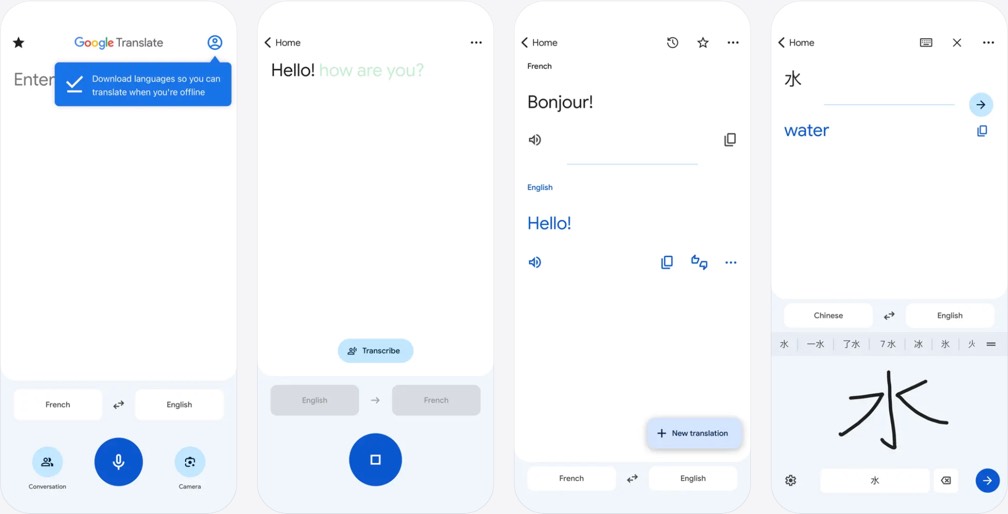
Google Translate remains the reference point for travel translation in 2026. Millions of travelers open it at immigration, in convenience stores, and on metro platforms because it covers an enormous range of languages and modes in one familiar interface. Text translation is instant; paste an address from a booking email or type a question and show the screen to someone across the counter.
Conversation mode is where Google Translate earns its place in a carry-on bag. Two people can speak alternately, with the app detecting languages and playing audio replies. That flow works well for hotel check-in, asking whether a market stall accepts cards, or clarifying a platform change announced over a loudspeaker you only half understood.
Camera translation overlays your language onto signs, menus, and packaging in real time. Import photos from your camera roll when you snapped a timetable in a hurry. Handwriting input helps for characters you cannot type. Offline packs are available for many languages—download them on hotel Wi‑Fi before you ride the subway or head into rural areas where data fades.
Google continues to fold AI into longer passages and contextual phrasing. It does not offer rich tone sliders, but its reliability, breadth, and free access make it the app most travelers already have installed. Keep it as your universal backup even if you prefer a specialist for voice polish or cultural tone.
Travel bloggers and backpackers still recommend Google Translate as the first app to install because it rarely refuses a language pair. When you hop from Portugal to Morocco to Thailand in one trip, one interface beats learning three apps. Pin your most-used languages to the top and enable auto-download of offline files when on Wi‑Fi so you never forget before a day trip.
Limitations are worth knowing. Very long menu photos may need multiple crops. Highly informal slang sometimes translates too literally. Pair Google with an AI-aware app when tone and explanation matter—negotiating a refund, writing to a host family, or sending a formal complaint.
 DeepL
DeepL
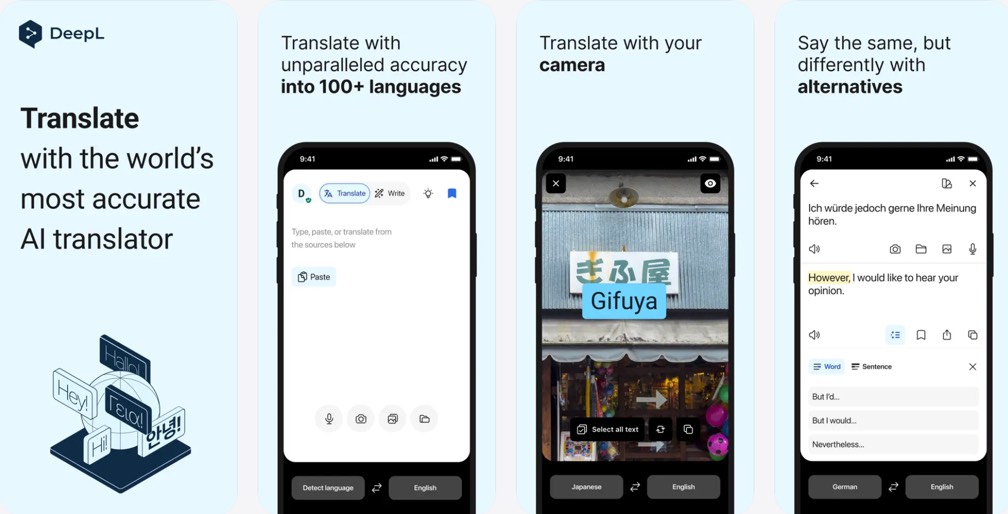
DeepL built its name on translations that read like they were written by a fluent human—not assembled word by word. For travelers, that matters when you are emailing a guesthouse, messaging a tour guide, or drafting a thank-you note after a homestay. The mobile app brings that quality to your pocket with text and voice input, plus camera capture for printed material.
Sentences in European and many Asian language pairs often sound natural in DeepL, with idioms handled more gracefully than in older engines. Speak a phrase and receive text you can edit before sending; that edit step is useful when you want to add a name or date to a reservation request.
Offline translation supports selected languages—verify your pair before you fly. DeepL is especially strong for written communication: confirming dietary restrictions, negotiating a late checkout, or apologizing when a train delay makes you miss a meetup.
Travelers who live in their inbox and messaging apps may make DeepL their primary writing tool, then switch to a conversation-focused app for spoken back-and-forth on the street. It is less about gimmicks and more about the quality of each line you send.
Students on semester abroad programs often keep DeepL for essay drafts and hostel emails while using a voice-first app on weekend trips. The writing quality reduces back-and-forth when you need to sound competent, not just understood.
Camera mode works best on printed text rather than stylized chalkboard script. For handwritten notes from a walking tour, photograph clearly and expect to edit names and numbers manually afterward.
 AI Translator
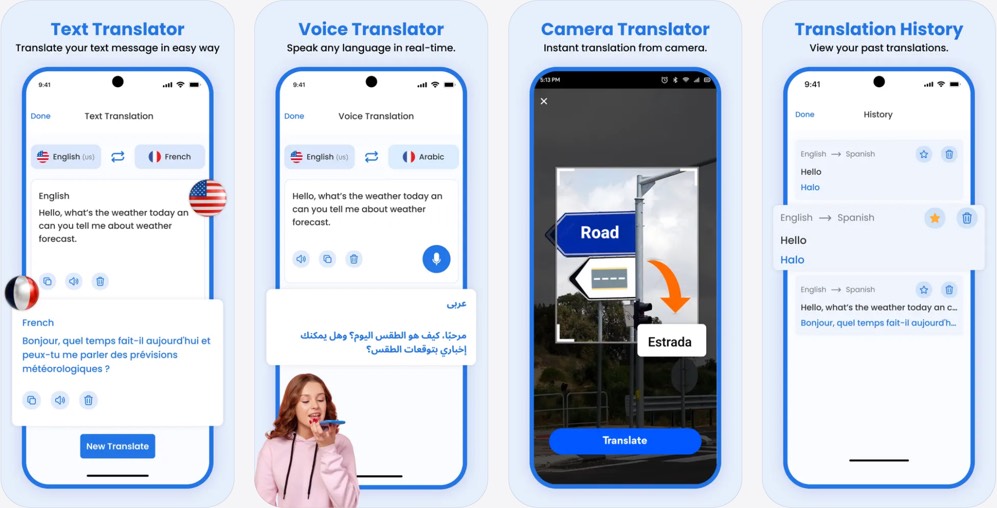
AI Translator by Vidalingua combines the travel essentials—voice, camera, offline, and text—in a single app designed around how people actually move through foreign cities. It supports dozens of languages and keeps the most-used tools one tap from the home screen.
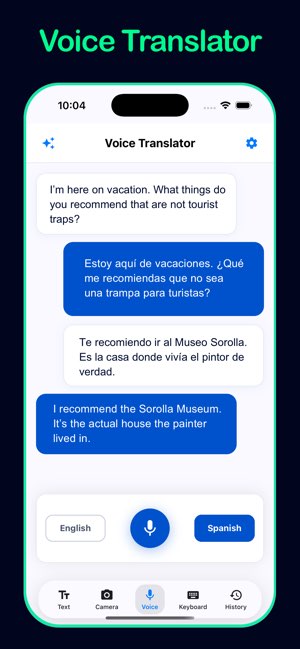
Voice Translator is built for real conversations. Speak naturally, hear the translation aloud, and flip direction without menu diving. That speed matters when a taxi driver is waiting, a queue is forming behind you at a kiosk, or you are trying to thank someone before they walk away.
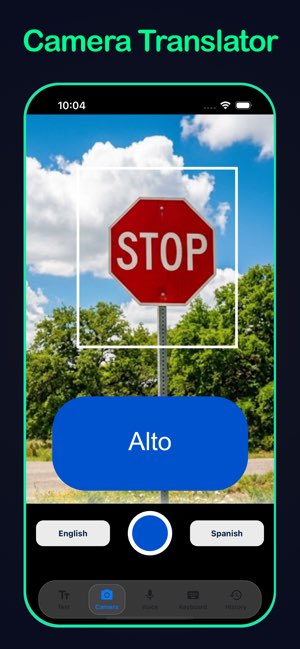
Camera Translator overlays translations on signs, menus, labels, and documents in real time. Photograph a dish, a warning label, or a museum caption and read the result immediately. Offline Translation downloads language models to your phone so tunnels, mountain roads, and festival crowds do not cut you off from help.
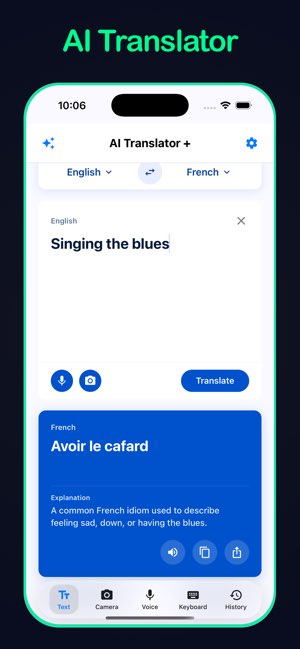
The AI layer is what travelers notice in 2026. Beyond a single translated line, you can get explanations that clarify meaning, grammar, and register—why one Japanese phrasing is polite and another sounds blunt. Tone options include Casual, Formal, Business, Travel, Academic, and more, so a message to a boutique hotel reads differently from a text to a friend from a hostel common room.
A custom translation keyboard works inside Messages, WhatsApp, email, and other apps without constant switching. Translation history saves lookups for your trip notes. Download free from the App Store or Google Play before your next flight and test voice plus camera at home.
Travelers comparing apps in 2026 consistently mention tone and explanation together: knowing what was said and how it sounds to a native speaker. AI Translator's Travel tone softens requests in ways that read natural at guesthouses and tour desks. Formal tone helps at embassies and rental counters without sounding robotic.
Gemini-powered models offer a fast path for quick lookups and a deeper path for complex paragraphs—useful when translating a museum audio guide transcript or a long WhatsApp voice note your new friend sent. Privacy-minded travelers can lean on offline mode for passports, tickets, and medical paperwork knowing processing stays on the device.


 Microsoft Translator
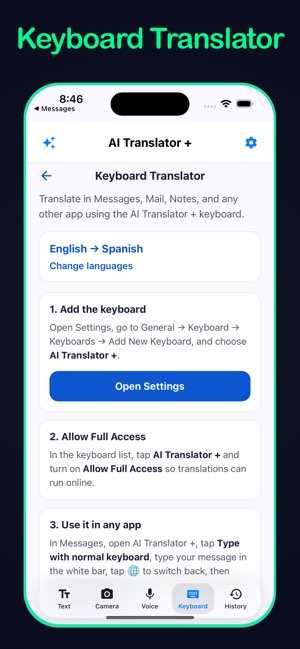
Microsoft Translator is a capable all-rounder that shines when travel involves groups or Microsoft services you already use. Text, voice, and camera translation cover a wide language set behind a clear interface that behaves well under stress at a train station.
Multi-person conversation mode lets several travelers join one session on their own phones, each reading in their language. That is unusually handy for family trips, student groups, or business delegations where not everyone shares a lingua franca.
Built-in phrasebooks organize essentials for directions, dining, health, and emergencies. Pin favorites for offline access. Camera mode handles signs and documents; voice mode supports hands-free use when luggage occupies both arms.
Microsoft has improved phrasing with AI on supported pairs. Tone controls are not as granular as dedicated AI translator apps, but the combination of group conversation, offline packs, and steady voice recognition makes this a dependable choice—especially for Android users and anyone living in Outlook, Teams, or Word on the road.
Conference travelers like splitting one QR conversation across attendees so everyone follows a factory tour or university visit in their own language. Phrasebook categories speed up repetitive trip moments—asking for a table for two, declaring nothing to customs, or directing a driver to stop here.
Split-screen and widget options on some devices let you translate without leaving maps or ride-share apps. If your work trip already runs on Microsoft 365, this app feels like an extension of tools you trust rather than yet another tourist download.
 Papago
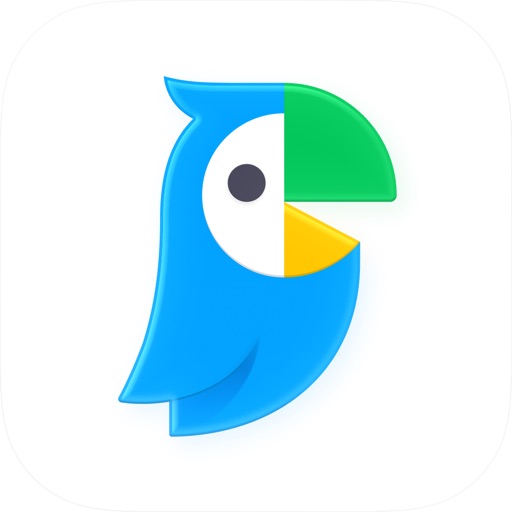
Papago from Naver is the app experienced Asia travelers recommend for Japan, Korea, and Chinese-language destinations. Voice, text, and image translation are tuned for East Asian scripts, honorifics, and everyday expressions that generic engines mishandle.
Conversation mode and politeness-aware output help in shops, restaurants, and transit hubs where register matters. Camera translation reads vertical storefront text and menu photos with useful alternatives when a literal line would sound unnatural.
Offline packs cover core pairs—download before bullet-train rides and island ferries. Voice recognition holds up reasonably against street noise in Tokyo, Seoul, and Osaka.
If your itinerary centers on East Asia, install Papago beside any global translator. For a round-the-world ticket, keep Papago for the Asian legs and lean on another app for European connections—but do not land in Busan or Kyoto without testing Papago offline first.
Korean learners note that Papago often suggests honorific variants when you type informal speech aimed at a stranger—exactly the kind of correction a traveler needs before speaking. Japanese menu translation frequently includes dish descriptions that help you guess ingredients when romanization alone would not.
Pair Papago with a Roman-alphabet-friendly app for countries outside East Asia on the same journey. Within the region it is often the difference between sounding respectful and accidentally blunt at a convenience store checkout.
 iTranslate
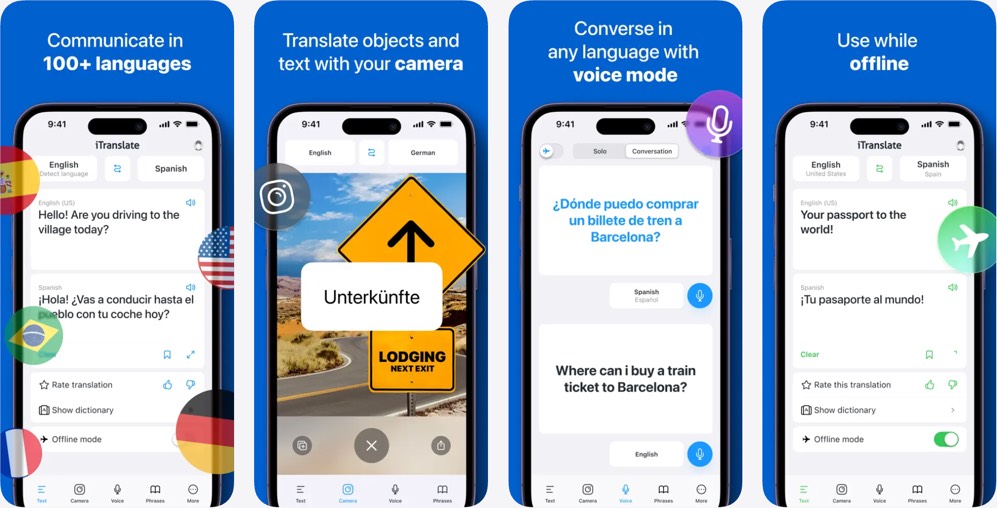
iTranslate has been a travel staple for years, pairing voice conversation, camera translation, and offline packs in a polished interface. A large language catalog and clear audio output help you hear pronunciation before you repeat a phrase to a stranger.
Voice modes alternate languages in a traveler-friendly rhythm. Camera translation works in the viewfinder or on saved images—ideal for rail timetables and gallery captions. Offline mode requires downloaded packs; confirm your languages while you still have home Wi‑Fi.
Transliteration for non-Latin scripts lets you show a cab driver characters they can read even when you cannot type them. That split between speaking and showing text prevents a lot of improvised charades at rush hour.
Ongoing AI refinements smooth longer sentences. iTranslate fits travelers who want familiar navigation, broad coverage, and reliable voice and camera tools without juggling a dozen single-purpose downloads.
Family travelers use iTranslate's voice loop so kids can ask simple questions at aquariums and theme parks without parents speaking for them. Adjustable voice speed helps when grandparents join a trip and need slower playback.
The app's longevity means many tutorials and forum threads exist for troubleshooting offline packs—helpful when you are already abroad and need a quick fix. Watch for dialect options when traveling across Spanish-speaking countries or Arabic-speaking regions where word choice shifts.
 Apple Translate
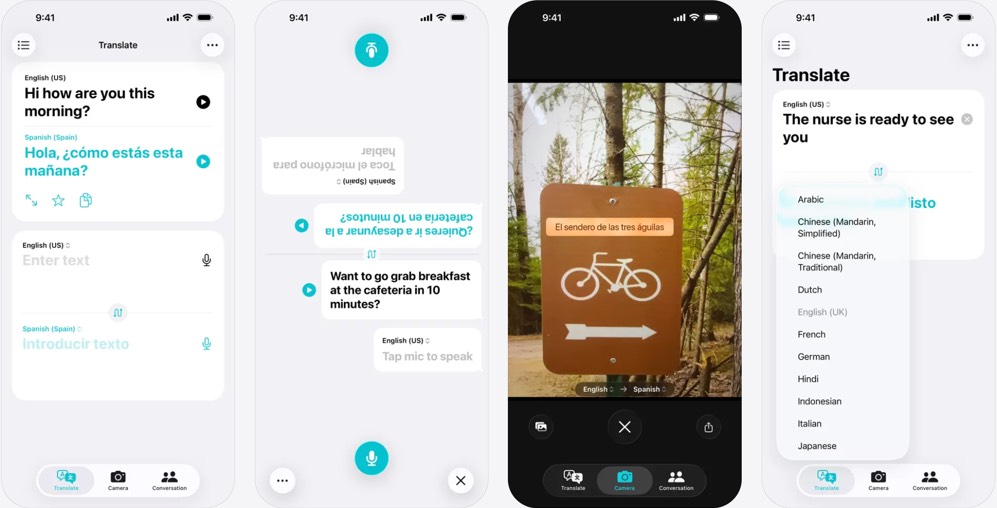
Apple Translate ships on iPhone and iPad, making it the zero-install option for many travelers. Open the app, choose languages, and use text or voice immediately. Conversation view rotates for face-to-face chats across a café table.
Download languages for offline use before long flights. Apple emphasizes on-device processing in offline mode—a plus if you prefer translations staying on your phone. System integration is a quiet strength: translate selected text in Safari, Messages, and other apps on recent iOS versions without copying and pasting.
Camera translation on newer iPhones lets you point at signs and labels similarly to third-party apps. The experience is streamlined rather than feature-maximal: fewer tone sliders, fewer long AI essays on every line.
iPhone travelers on short trips may find Apple Translate enough for basics; multi-country itineraries or nuanced business communication still benefit from a dedicated translator with travel tones and deeper AI context installed as backup.
Apple's Live Translate features in newer phone generations push translation closer to phone calls and messaging threads. For travelers already deep in the Apple ecosystem, that reduces friction compared with exporting text to a third party.
Limitations remain for travelers who need Android, advanced tone control, or detailed grammar notes on every line. Treat Apple Translate as a capable default on iPhone, not the only tool in your kit for a month-long multi-country adventure.
 SayHi Translate
SayHi Translate strips the interface down to what nervous travelers need: speak, listen, and be understood. Large buttons and clear playback help when you are jet-lagged and cannot remember how to switch keyboards.
Hold-to-talk voice translation covers many languages and dialects, with adjustable speech speed when replies come fast. Show your screen or let the app speak aloud—both patterns work in markets, clinics, and tour groups.
SayHi is lighter on document camera features than Google or AI Translator, but as a voice bridge it remains popular on cruises and guided tours. Travelers who freeze when typing in another alphabet often relax when they can simply talk.
Download destination languages for offline voice where supported, practice a few lines before landing, and pair SayHi with a camera-strong app when menus and signs matter as much as dialogue.
Cruise passengers and tour-bus groups favor SayHi because the UI reads well at arm's length—show the screen across a seat row and everyone hears the playback. Adjustable voice gender and speed help when you are practicing pronunciation before a guided walk.
When you also need to read ingredient lists or rail maps, keep a camera-strong app installed. SayHi wins the spoken moment; let your second app win the printed one.
Frequently asked questions
What is the best translator app for international travel? No single app wins every scenario. Google Translate offers the broadest language coverage; Papago excels in East Asia; AI Translator by Vidalingua combines voice, camera, offline mode, and AI tone controls in one travel-focused package. Most frequent travelers install two apps with different strengths.
Do translator apps work without internet? Many do if you download offline language packs ahead of time. Quality and available languages vary. Always test offline mode at home in airplane mode before relying on it abroad.
Is voice translation accurate enough for medical situations? Apps improve every year, but critical health communication deserves caution. Use short, clear sentences, show the screen to staff, and seek human interpreters when available for serious emergencies.
What are AI translation descriptions? They explain context, grammar, or usage beyond the translated line—why a phrase is formal, which word choice sounds natural, or what a literal rendering missed. They help travelers learn while solving immediate problems.
Can I translate menus from photos? Yes. Camera or picture translation is standard in leading apps. Lighting and focus matter; shoot straight-on and crop to the text block for best results.
Which app is best for Japan? Papago and AI Translator both perform well for Japanese travel scenarios—Papago for regional East Asia depth, AI Translator for voice, camera, offline packs, and adjustable tone in one app used worldwide.
Should I learn the language if I have an app? Absolutely learn basics—hello, please, thank you, and excuse me open doors that technology alone cannot. Apps handle complexity; human effort handles respect. The combination makes you a guest people remember fondly rather than a tourist who only talks through a screen.
How to choose the right translator for your trip
Match the app to destination and style. East Asia itineraries benefit from Papago plus a global option. iPhone users can start with Apple Translate but should add backup with stronger camera and tone features before multi-country tours. Business travelers who email hosts may lean on DeepL for prose and AI Translator or Microsoft Translator for live conversations.
Test voice and camera in a noisy café and a dim restaurant. Download offline packs on Wi‑Fi and confirm they work in airplane mode. Save hotel addresses, allergy notes, and confirmation numbers to favorites or screenshots.
Travel translation tips for 2026
Learn local greetings and thank-yous—apps partner with courtesy, they do not replace it. Speak in short sentences for voice translation; pause so the engine catches phrase boundaries. Hold the phone steady for camera mode and fill the frame with text. Use formal tone with officials; casual tone with peers your age.
If an AI explanation marks a phrase as informal or regional, believe it before using it with a stranger. Carry a portable charger. Screenshot translations that must survive spotty connectivity.
Install two complementary apps, practice once at home, and travel knowing a misunderstood menu or missed announcement does not have to derail your trip.
Before your next departure, run through a five-minute drill: translate a voice question, photograph a printed page, toggle offline mode, and send a message in formal tone. The apps that pass that test belong on your home screen. The ones that feel clumsy can wait until your itinerary demands their specialty.
Translation technology will keep evolving through 2026 and beyond, but the traveler's needs stay surprisingly steady—be understood, read the world around you, and recover gracefully when the wrong train arrives. Pick tools that do those jobs reliably, and spend your energy on the trip itself.
Safe travels—and if we missed your favorite translator, email outreach@vidalingua.com.

Harold Gretouce
French Teacher, Naples Florida

Top Travel Blogs for Japan
Discover hidden gems, travel hacks, and city guides for Tokyo, Kyoto, Osaka, and beyond.

Best Airlines for International
Compare top international carriers for comfort, service, and value on long-haul flights.

French Canadian
101 Quebec slang terms and expressions for travelers exploring Canada.
Email us at outreach@vidalingua.com.